
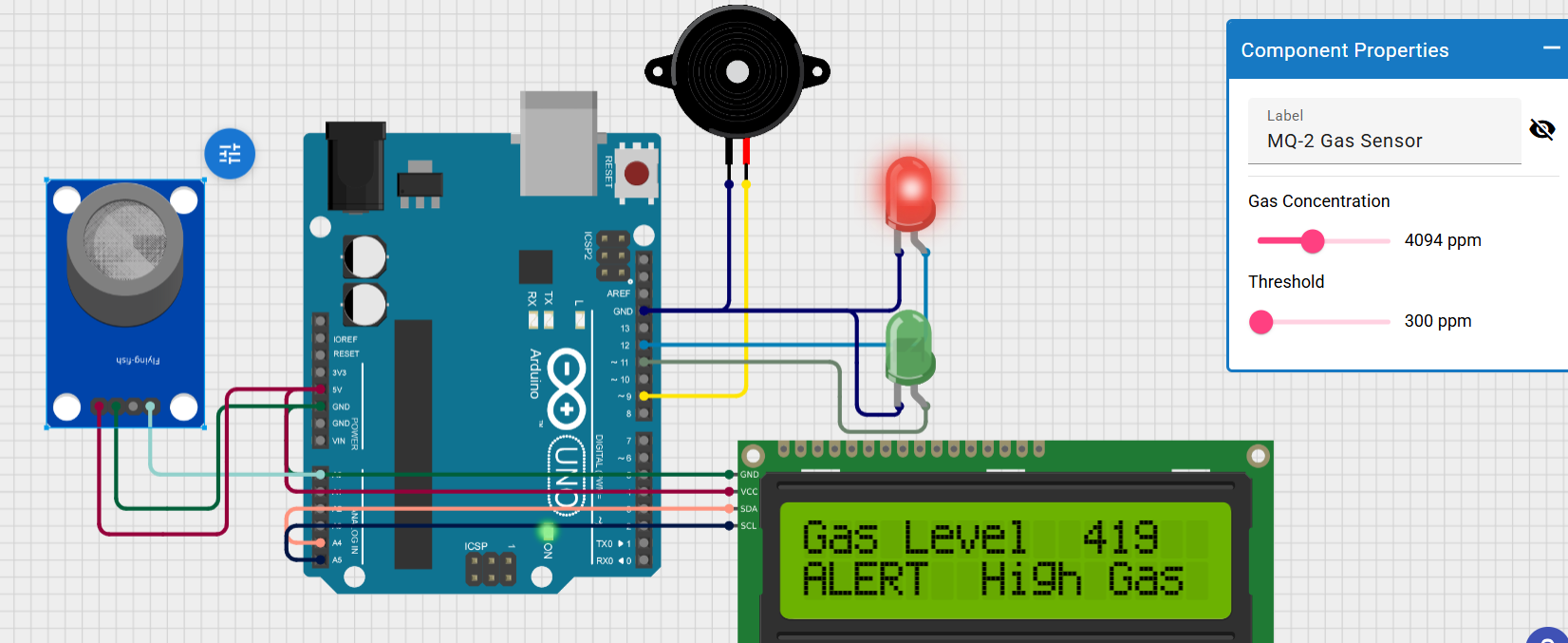
The Gas Leakage Detection System is a safety project designed to detect the leakage of LPG, methane, propane, and other combustible gases using an MQ-2 Gas Sensor. When the gas concentration exceeds a predefined threshold, the Arduino activates a buzzer to provide a local warning . This system helps prevent accidents in homes, kitchens, laboratories, hotels, and industries by providing an immediate alert.
| Component | Quantity |
|---|---|
| Arduino Uno | 1 |
| MQ-2 Gas Sensor Module | 1 |
| Active Buzzer | 1 |
| Jumper Wires | As required |
| Breadboard | 1 |
#include <DHT.h>
#include <DHT_U.h>
#include <LiquidCrystal_I2C_Hangul.h>
/*
 * Arduino Sketch for displaying temperature and humidity on a 16x2 I2C LCD.
 * The circuit includes a DHT22 sensor for temperature and humidity readings,
 * and a piezo speaker that rings when the temperature exceeds 40°C. The LCD
 * displays an alert message when the temperature is above 40°C.
 */

#include <Wire.h>


#define DHTPIN 8          // Pin connected to the DHT22 data pin
#define DHTTYPE DHT22     // DHT 22 (AM2302)
#define BUZZER_PIN 9      // Pin connected to the piezo speaker

LiquidCrystal_I2C_Hangul lcd(0x27, 16, 2); // Set the LCD address to 0x27 for a 16x2
DHT dht(DHTPIN, DHTTYPE);

void setup() {
  lcd.init();
  lcd.backlight();
  dht.begin();
  pinMode(BUZZER_PIN, OUTPUT);
  digitalWrite(BUZZER_PIN, LOW);
}

void loop() {
  float humidity = dht.readHumidity();
  float temperature = dht.readTemperature();

  if (isnan(humidity) || isnan(temperature)) {
    lcd.clear();
    lcd.setCursor(0, 0);
    lcd.print("Sensor error");
    return;
  }

  lcd.clear();
  lcd.setCursor(0, 0);
  lcd.print("Temp: ");
  lcd.print(temperature);
  lcd.print(" C");

  lcd.setCursor(0, 1);
  lcd.print("Hum: ");
  lcd.print(humidity);
  lcd.print(" %");

  if (temperature > 40) {
    digitalWrite(BUZZER_PIN, HIGH);
    lcd.setCursor(0, 1);
    lcd.print("ALERT: High Temp");
  } else {
    digitalWrite(BUZZER_PIN, LOW);
  }

  delay(2000); // Wait 2 seconds before next reading
}
Get an official Project Completion Certificate with a unique ID & QR verification — perfect for internships, resumes, and college submissions.
Get Certificate →