
The IoT Based Smart Farm Monitoring System is designed to automate irrigation by monitoring the soil moisture level using an ESP32 microcontroller. The ESP32 hosts a simple web dashboard that can be accessed through its IP address while connected to the same Wi-Fi network. Farmers can monitor real-time soil moisture, temperature, humidity, and pump status, as well as manually control the water pump from any smartphone, tablet, or computer on the local network.
The system also supports automatic pump control, where the pump turns ON when the soil becomes dry and turns OFF once adequate moisture is detected, ensuring efficient water usage and reducing manual effort.
| Component | Quantity |
|---|---|
| ESP32 Development Board | 1 |
| Capacitive Soil Moisture Sensor | 1 |
| DHT22 Temperature & Humidity Sensor | 1 |
| Single Channel Relay Module | 1 |
| 12V DC Water Pump | 1 |
| 12V Power Supply | 1 |
| Jumper Wires | As required |
| Breadboard | 1 |
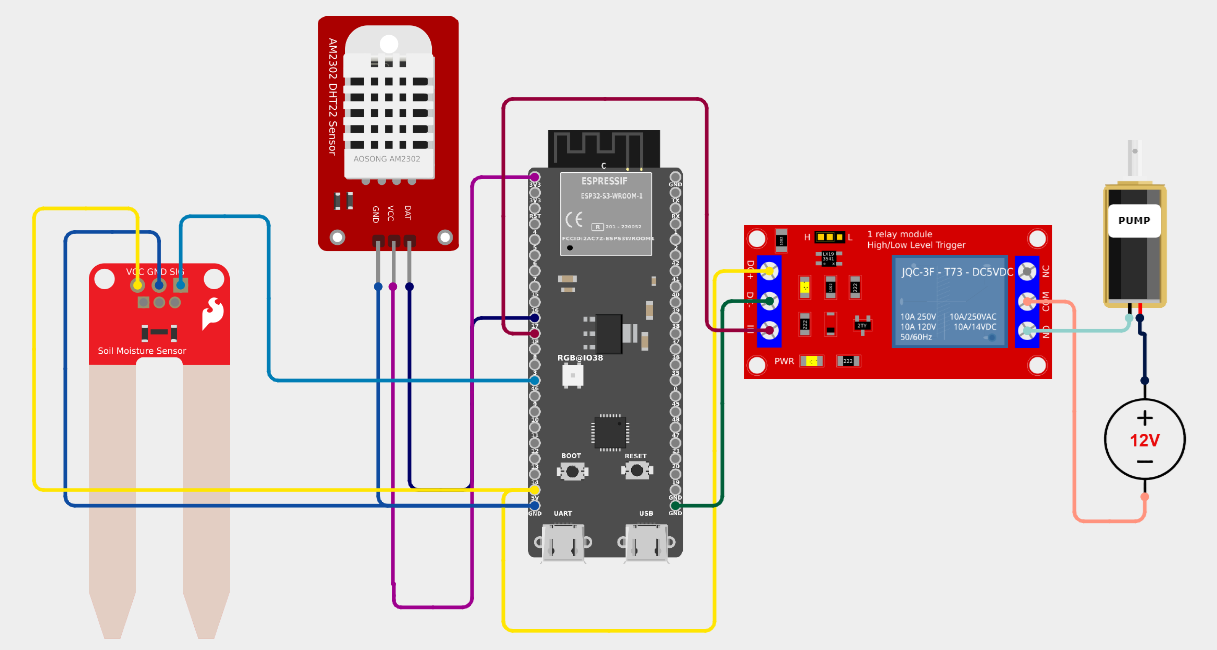
/*
* This Arduino Sketch sets up an ESP32 as a web server. It displays temperature,
* humidity, soil moisture percentage, and pump status on a web page. The pump
* is controlled based on soil moisture: it turns on when the soil is dry and
* off when the soil is wet. The DHT22 sensor is used for temperature and
* humidity readings, and a relay module controls the pump.
*/
#include <WiFi.h>
#include <WebServer.h>
#include <DHT.h>
// Pin Definitions
#define DHTPIN 17
#define DHTTYPE DHT22
#define RELAY_PIN 18
#define SOIL_MOISTURE_PIN 46
// Network Credentials
const char* ssid = "your_SSID";
const char* password = "your_PASSWORD";
// Create DHT sensor instance
DHT dht(DHTPIN, DHTTYPE);
// Create a web server object
WebServer server(80);
void setup() {
Serial.begin(115200);
dht.begin();
pinMode(RELAY_PIN, OUTPUT);
digitalWrite(RELAY_PIN, LOW); // Ensure pump is off initially
// Connect to Wi-Fi
WiFi.begin(ssid, password);
while (WiFi.status() != WL_CONNECTED) {
delay(1000);
Serial.println("Connecting to WiFi...");
}
Serial.println("Connected to WiFi");
Serial.println(WiFi.localIP());
// Define web server routes
server.on("/", handleRoot);
server.begin();
}
void loop() {
server.handleClient();
managePump();
}
void handleRoot() {
float humidity = dht.readHumidity();
float temperature = dht.readTemperature();
int soilMoistureValue = analogRead(SOIL_MOISTURE_PIN);
float soilMoisturePercent = map(soilMoistureValue, 0, 4095, 0, 100);
String pumpStatus = digitalRead(RELAY_PIN) ? "ON" : "OFF";
String html = "<html><body><h1>ESP32 Web Server</h1>";
html += "<p>Temperature: " + String(temperature) + " °C</p>";
html += "<p>Humidity: " + String(humidity) + " %</p>";
html += "<p>Soil Moisture: " + String(soilMoisturePercent) + " %</p>";
html += "<p>Pump Status: " + pumpStatus + "</p>";
html += "</body></html>";
server.send(200, "text/html", html);
}
void managePump() {
int soilMoistureValue = analogRead(SOIL_MOISTURE_PIN);
float soilMoisturePercent = map(soilMoistureValue, 0, 4095, 0, 100);
if (soilMoisturePercent < 30) {
digitalWrite(RELAY_PIN, HIGH); // Turn pump on
} else {
digitalWrite(RELAY_PIN, LOW); // Turn pump off
}
}
Get an official Project Completion Certificate with a unique ID & QR verification — perfect for internships, resumes, and college submissions.
Get Certificate →