
Traditional lock-and-key systems can be inconvenient due to lost keys, duplicate keys, and security concerns. An RFID-based access control system provides a secure, contactless, and user-friendly alternative.
This project uses an Arduino Uno, an MFRC522 RFID Reader, and a Solenoid Lock to implement an automatic door locking system. When an RFID card is placed near the reader, the Arduino reads its UID and verifies it. I
| Component | Quantity |
|---|
| Arduino Uno | 1 |
| MFRC522 RFID Reader | 1 |
| RFID Card/Tag | 2 |
| Selonoid Valve | 1 |
| Breadboard | 1 |
| Jumper Wires | As Required |
| USB Cable | 1 |
| Power Supply | 5V |
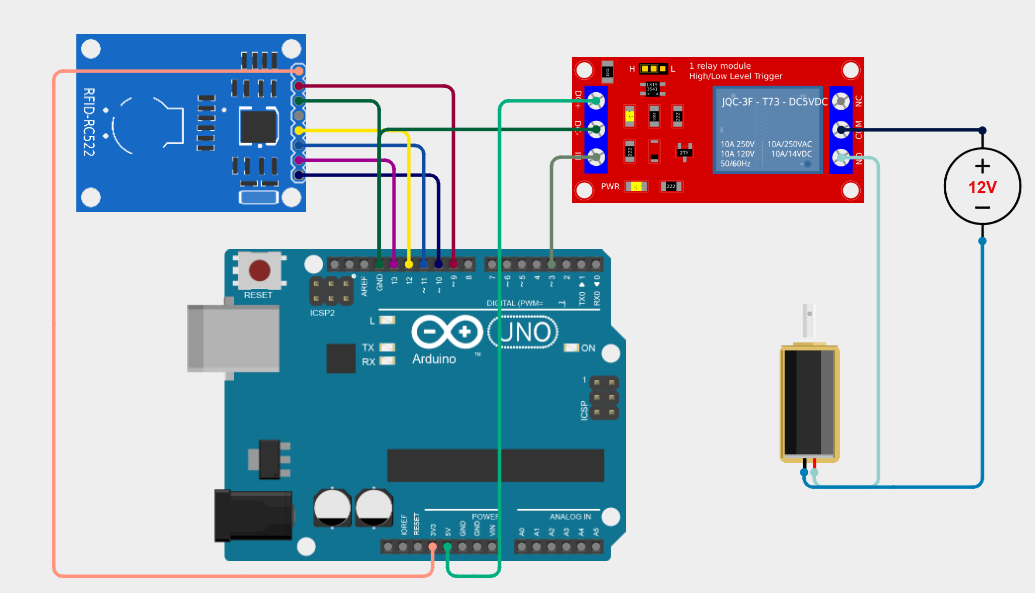
/*
 * This Arduino Sketch interfaces with an RC522 RFID module and a relay module.
 * When an RFID tag is scanned, the relay is activated for 5 seconds, allowing
 * the connected solenoid to operate. The relay then turns off automatically.
 */

#include <SPI.h>
#include <MFRC522.h>

#define SS_PIN 10
#define RST_PIN 9
#define RELAY_PIN 3

MFRC522 mfrc522(SS_PIN, RST_PIN);  // Create MFRC522 instance

void setup() {
  Serial.begin(9600);  // Initialize serial communications
  SPI.begin();         // Init SPI bus
  mfrc522.PCD_Init();  // Init MFRC522
  pinMode(RELAY_PIN, OUTPUT);
  digitalWrite(RELAY_PIN, LOW);  // Ensure relay is off
  Serial.println("Place your RFID card near the reader...");
}

void loop() {
  // Look for new cards
  if (!mfrc522.PICC_IsNewCardPresent() ||
      !mfrc522.PICC_ReadCardSerial()) {
    return;
  }

  Serial.print("Card UID:");
  for (byte i = 0; i < mfrc522.uid.size; i++) {
    Serial.print(mfrc522.uid.uidByte[i] < 0x10 ? " 0" : " ");
    Serial.print(mfrc522.uid.uidByte[i], HEX);
  }
  Serial.println();

  // Activate relay for 5 seconds
  digitalWrite(RELAY_PIN, HIGH);
  delay(5000);
  digitalWrite(RELAY_PIN, LOW);

  // Halt PICC
  mfrc522.PICC_HaltA();
  // Stop encryption on PCD
  mfrc522.PCD_StopCrypto1();
}
Get an official Project Completion Certificate with a unique ID & QR verification — perfect for internships, resumes, and college submissions.
Get Certificate →