
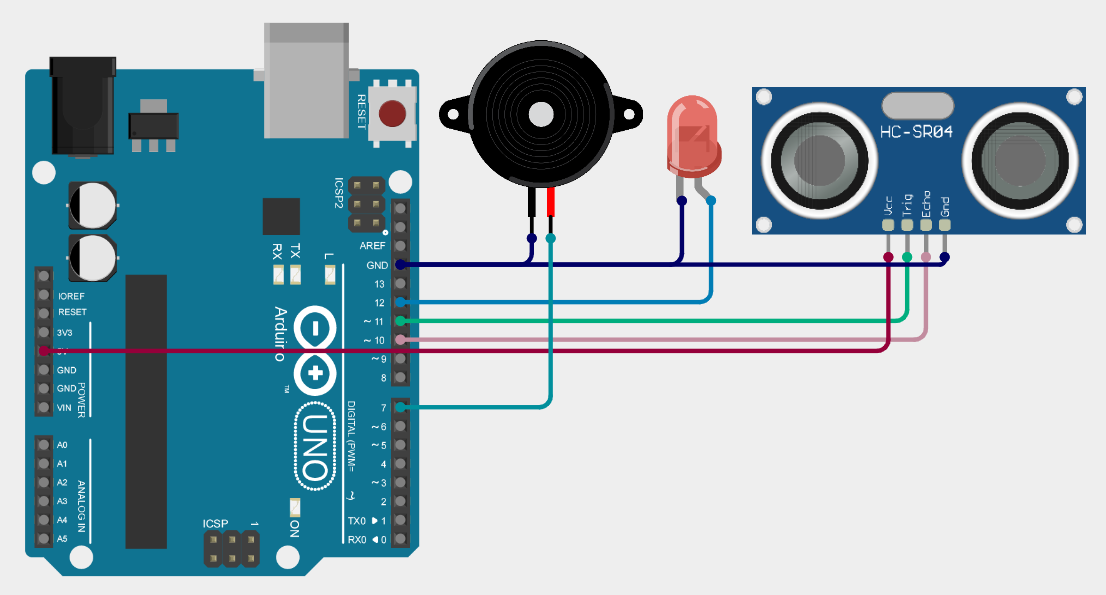
/*
 * Arduino Sketch for measuring distance using an HC-SR04 Ultrasonic Sensor.
 * The circuit includes a Piezo Speaker and an LED that turn on when the
 * measured distance is between 40 and 50 cm.
 */

#include <Wire.h>
#include <LiquidCrystal_I2C_Hangul.h>

// Pin definitions
#define TRIG_PIN 11  // Pin connected to HC-SR04 TRIG
#define ECHO_PIN 10  // Pin connected to HC-SR04 ECHO
#define LED_PIN 12   // Pin connected to the LED
#define BUZZER_PIN 7 // Pin connected to the Piezo Speaker

// LCD setup
LiquidCrystal_I2C_Hangul lcd(0x27, 16, 2); // LCD address 0x27, 16x2 display

void setup() {
  lcd.init();
  lcd.backlight();
  pinMode(TRIG_PIN, OUTPUT);
  pinMode(ECHO_PIN, INPUT);
  pinMode(LED_PIN, OUTPUT);
  pinMode(BUZZER_PIN, OUTPUT);
  digitalWrite(LED_PIN, LOW);
  digitalWrite(BUZZER_PIN, LOW);
}

void loop() {
  long duration;
  int distance;

  // Clear the TRIG_PIN
  digitalWrite(TRIG_PIN, LOW);
  delayMicroseconds(2);

  // Set the TRIG_PIN high for 10 microseconds
  digitalWrite(TRIG_PIN, HIGH);
  delayMicroseconds(10);
  digitalWrite(TRIG_PIN, LOW);

  // Read the ECHO_PIN, returns the sound wave travel time in microseconds
  duration = pulseIn(ECHO_PIN, HIGH);

  // Calculate the distance
  distance = duration * 0.034 / 2;

  // Display distance on LCD
  lcd.clear();
  lcd.setCursor(0, 0);
  lcd.print("Distance: ");
  lcd.print(distance);
  lcd.print(" cm");

  // Check if distance is between 40 and 50 cm
  if (distance >= 40 && distance <= 50) {
    digitalWrite(LED_PIN, HIGH);   // Turn on LED
    digitalWrite(BUZZER_PIN, HIGH);// Turn on Buzzer
  } else {
    digitalWrite(LED_PIN, LOW);    // Turn off LED
    digitalWrite(BUZZER_PIN, LOW); // Turn off Buzzer
  }

  delay(1000); // Wait 1 second before next reading
}
Get an official Project Completion Certificate with a unique ID & QR verification — perfect for internships, resumes, and college submissions.
Get Certificate →